Wednesday, August 20, 2014

Final Reflection
Well the end of EDU-533 is upon us... This week we've completed our WebQuests!, and stop for final reflection on our course outcomes and objectives.
Objective #7
It is imperative that we start using technology in schools to help our students achieve more. Technology makes things easier....... We use it in every other facet of life, (maybe not if you're Amish) we shouldn't let our education system be any different. It needs to be in school from K-12.
Through our textbook, but also along with class I have slowly started to build my Personal Learning Network. I have slowly introduced a handful of bloggers that I follow to keep abreast of the latest and greatest tech for teachers. I've created my own diigo account, how ever small it is, I can still give back to my digital community a little if they find my diigo pages interesting. I also have a few created a few personal community connects from my childrens' teachers at the local elementary school. The most important thing though is that I've taken the first step. I've learned that creating you PLN is not easy, it takes a long time, and hard work. You have to put in a great deal of energy if you wish to take out a great deal.
Objective #7
Turn theory into practice by completing 5 hours of related field experience.
This objective was met through, an interview with someone who actively integrated technology into the classroom. My Interview was with Jeff Utecht. I posted my interview questions and responses in last week's blog and I almost feel as though that was a final reflection in and of itself. Jeff touched on so many things that we had covered in the course, I'm still kind of shaking my head.... Did I ask great questions? Did he just have AWESOME answers? I think it was the latter....
Objective # 2
Learn ways to promote student reflection using collaborative tools to reveal and clarify students' conceptual understanding
This learning outcome was met through a few web2.0 tools that we used in the final weeks. One was digital storytelling, we used a web tool called Animoto to complete a lesson plan that made us think about the task at hand and then "show what we know" by telling a digital story through multiple mediums. Through visual images, audio or musical sounds, and text/words to go along with the pictures. We have also been blogging for the entire 10 weeks, which is probably the best way we can promote student reflection. It also has a small collaborative element too, when students are commenting on each others posts.
Objective #4
Illustrate through application how state and national standards are implemented within the curriculum.
The last three projects we worked on all had state and national curriculum requirements. The Digital Story, The I Am Poem, and our Webquests, all had requirements of posting at least two standards that were met by CCSS and ITSE NETS. Science Webquests also used GLE's if applicable. We also explore web tools like Rubistar and others that help teachers apply standards in an even and reproducible way, so that fairness for all students was evident.
Objective #5
Demonstrate an understanding of the use of assistive and adaptive technologies and other digital resources to personalize and differentiate learning activities for every student.
Last class we had a little round table discussion on a few of the assistive technologies that some fellow classmates had experienced in their schools. One example was the teachers who had audio amplification in their classrooms. Another was software that teachers could upload onto the computers that help students with the definitions of hard vocabulary words, simply by clicking on the word the definition comes up. Another program was one that helps students who have trouble reading, by reading aloud text that is highlighted and clicked. Both of these last examples were free programs through google.
"What is it we hope to accomplish and what’s stopping us?"
After taking this class and listening to classmates, I was kind of surprised by the vast differences in schools. Some having one to one, others having maybe only one computer room....(what is that? 1 to 50?) We can not let school or city budgets keep us from exposing kids to technology. We as teachers must find ways to get our kids involved with technology until our schools or cities catch up to the times. Most of our students have internet access at homes, we can make choices that allow them to use that technology if there is none available in our classrooms. Make the typical book report and Podcast with Audioboo. Create a google doc, where students can collaborate on a team project over the weekend. We need to find ways, complaining that your school doesn't support you does not help the students. Yes we need to voice our opinions but in the mean time we need to also support the students.Through our textbook, but also along with class I have slowly started to build my Personal Learning Network. I have slowly introduced a handful of bloggers that I follow to keep abreast of the latest and greatest tech for teachers. I've created my own diigo account, how ever small it is, I can still give back to my digital community a little if they find my diigo pages interesting. I also have a few created a few personal community connects from my childrens' teachers at the local elementary school. The most important thing though is that I've taken the first step. I've learned that creating you PLN is not easy, it takes a long time, and hard work. You have to put in a great deal of energy if you wish to take out a great deal.
Wednesday, August 13, 2014
Real World Technology Use


When I sat down to create my list of questions for our field interview, I had a current classroom teacher in mind. I was hoping to gain a more tech savvy perspective on what was currently going on in a well integrated classroom. I had visited that teacher’s classroom blog, and as I was crafting my questions, I was visualizing what the answers might be. Well, when I requested an interview the teacher never responded, so.... when I first contacted Jeff Utecht, I was worried that his answers might not mesh with what I had been visualizing. No need to worry, when I received Jeff’s responses, it seemed like each one fit perfectly with something we had touched upon in class or an assigned reading.
A brief background on Jeff Utecht. Jeff is currently an educational technology consultant. He started his career as an elementary teacher, and progressed to one of today's current leaders in the movement to integrate technology into our school systems, and the professional development plans of staff. His first book, “Reach” published in 2010, delivers a strong and passionate example of how technology can help people connect from around the globe, improving the student’s and the teacher’s educational journey.
Question #1. What is the best advice you can give to me, as a new elementary teacher, in regards to technology integration?
Easy....create a PLN (Personal Learning Network). Understand that the educational community on Twitter and Google+ is AMAZING and will be the best professional development you will ever get. I have attached a copy of my book...feel free to share it with everyone in your course.....on how to get started.
O.k., that makes since, I had been slowly creating my PLN, since day 1. It started with my Professor, and my Learning through Technology classmates. I uploaded my classmates' blogs into an RSS reader so I could easily view their posts, and I was slowly adding more and more as the weeks passed(Jeff Utecht, Maria Knee, Richard Byrne)…...this RSS feeder was a great way to gain information about how technology was changing our world as we know it, in and out of the classroom. This is my first class on the way to obtaining my teaching certificate, so having a steady feed of great blog sites with current tools and resources I will need throughout my career is a great first step.
“As mentioned earlier, I believe that RSS (Really Simple
Syndication) might just be the best tool that has emerged out of the
Web 2.0 revolution. I recommend starting to build your network
around an RSS reader. Using RSS, as discussed in Chapter One, also
allows you to create your personal learning network without joining a
community. No need to worry about your avatar (small icon picture
that comes with a community profile) or how and with whom you
should connect. Starting with an RSS reader and then moving into a
community of learners is my recommended process.” Reach, Jeff Utecht, 2010
Question #2. Is there one particular subject area(math, reading, science), that you feel the use of technology during lessons is more impactful or engaging to the students?
Nope....all of the above...and it will depend on what technology you have available with your students. Makes it tough in your pre-teaching program as you don't know what you'll have. I would say....constantly reflect on what you are teaching students and make sure they are the skills they need for THEIR FUTURE not our past.
Examples:
Teach digital maps not paper maps
Teach keyboarding not cursive
Teach how to write an email not a letter
Teach how to read a web page
These are skills that are for their future
Jeff’s response, touched on many things I had heard or seen during class. First off reflecting or visualizing what I will do when I first step into the classroom has been tough without knowing what types of "tech" hardware I will have at my disposal. The handful of teachers we have in EDU-533, seem to be spread out over a wide range. We have teachers who work at schools with one to one ratio’s and we have teachers with little or no "in" classroom tech, only computer labs that the students may visit a few times per week. The second would be constant reflection. We have discussed how teachers need to gather information from their own classes and share it with other teachers. Its only through this sharing and reflecting can we make meaningful changes. The things that were relevant in the past, the things that we grew up with, what and how we learned in school has changed. Teachers need to constantly reflect on what they are doing, and why are they doing it? Can it be done better? This quote is from one of our readings on "reinventing the wheel".
3. What is the one piece of technology or software application that is currently your favorite for home use and you would recommend for students in 1st-5th grade?
The Internet.....period. It is the most important app on any device and that alone changes learning. It's not about the software, it's about the learning! There is no "one piece of technology". We start with learning and work backwards from there.
This question and answer made me reflect on our discussions about Digital Citizenship. How it is our job as teachers to slowly introduce our students to the internet. Starting when in kindergarten we must build a strong foundation and build upon that each and every day. Teaching appropriate behavior online, just as we would teach appropriate behavior in class. Creating a safe atmosphere where kids can get on the internet, learn by investigating, exploring, and sharing with students in their school, across the country or across the world.
4. Do you feel that classroom blogs/websites have increased parental engagement?
Yes...and every student should have their own blog!
Maria Knee, who is a kindergarten teacher in Deerfield, NH, has an excellent example of how to effectively run a classroom blog. Every student has their own page, and gives them an outlet to express their thoughts, share their work, and start living in today’s world. The students get exposure to things they’ll experience at home, whether that is their parent sending off an email to work, reading the news off of their tablet, or perhaps Mom or Dad posting pictures of their latest vacation and sharing it with friends and siblings via social media. In the past sharing their schoolwork was a magnet on the refrigerator, today and in the future it will be uploaded onto the computer, into their blog, and shared via the internet.
5. Can you think of something that technology has replaced that you or your students miss?
???? Not sure I get this questions. We have to give something up if we're going to use technology.....what we give up is always hard...but this isn't new.....it's always been this way. Oral traditions went away with the book, paper is going away with the computer. Books are being replaced by the Internet. One technology always replaces the other...we need to learn to let go...it's ok.....we'll be OK.
I guess I was looking for a more personal answer here. Maybe not one that meant something big, or had some deep philosophical meaning. Myself, I kind of miss the written personal letter. I remember back to when I first started college, getting written letters in the mail was so exciting. Maybe, if technology allows the school to reduce the physical size of a school library it would make more room for actual classrooms, but would we then be nostalgic about that nice quiet room that had a distinctive paper smell?? I guess to Jeff's point, if we choose to go that route because extra classrooms would reduce the student to teacher ratio, we have chosen the option that is best for our future.
6. How have schools benefited the most from technology integration ?
When done correctly everyone ones. Learning increases, teacher time preparing lessons is reduced, we get to spend more time actively engaged in the learning process.
During class I had watched this webinar about differentiated learning, and was just amazed at some of the products that certain companies are putting out that can help develop individualized lesson plans. The webinar I watched was sponsored by Dreambox, and I know Jeff is involved with helping schools who want to bring Google Apps into their classrooms. I was so amazed at what computers can do and how fast they can do it. It reminds me of the computer “Watson”, that IBM created for Jeopardy, and how it could take little nuances from the questions and come up with the correct answers so quickly. IBM is now taking that technology into the medical field....how about the educational field? Dreambox talks about how they can adapt lesson plans as the student is working….. thats crazy! As the student is answering questions the software takes correct and incorrect answers and adapts the lesson plan on the spot....In years past a teacher may go through a whole unit, test the children, then reflect on their lesson plans, taking action much later, if not too late! Technology can now make sure that no student gets looked over, that each one gets an individualized lesson plan, and the teachers are there to help facilitate the learning , and when needed and can give individualized help… We are not talking about averages anymore….we are talking about exceptional.
7. Do you think technology will help bring down the cost of education? K-12? Colleges & Universities?
Not in K-12 but in University for sure! By 2025 we'll see a pretty different university system. Some traditional schools will remain but for the most part they will be different......better and more focused on what we know we need going forward. Problem finders as well as problem solvers.
Hope that helps,
Jeff
This last question, is a crucial point when talking about effectively getting schools to integrate technology. Every school seems to be operating on a strapped budget. How will all schools get this technology, and then even tougher is how will they be able to develop and train their faculty so they know how to effectively use this technology. It will probably cost lots of money, in which the schools don’t have. Teachers will have to take their professional development into their own hands. They’ll have to browse the web, listen to webinars, become familiar with tools they do currently have available in their schools. Like most teachers already do, they will have to bring their own resources in, camera or iPad for uploading images into class blogs, digital stories they have created at home. Unfortunately I see no easy answer for the financial hurdles ahead. Bill Gates delivered this TED talk on state budgets and education that feel everyone should see.
In final reflection, Jeff brought together all the things we have been working on in class perfectly. No this financial problem will not disappear. Teachers will have to create their own PLN’s and take professional development into their own hands and then bring what they learn to the students themselves. Technology has the most amazing potential, but it still needs to be driven by teachers who have an unquenchable passion for helping students learn. Once students have been taught how to “find problems and solve problems” they can help develop their own educational path. Each and every one of our students is different. It is now the standard for teachers in the 21st century to develop differentiated lesson plans that use contemporary tools for administering, assessing, and evaluating. The image that started this blog "Success", if you notice some of the essential building blocks that lead to success are; teach, innovation, invention, teamwork. All these things are important in today's classroom and will be important in our student's future.
Wednesday, August 6, 2014
Digital Story in Animo
I thought Animoto was a very well put together program. It was easy to upload pictures, add text below the pictures, or even title slides. It was very user friendly, you just click and drag the tiles where you want them to go. I was confused on how to cite my sources at the end though, I guess I should have thought about this step earlier in the process. When I was finding images and adding them to a file on my computer for uploading I thought the http:// address would still be there... it was not. This was me just not being very familiar with saving images. Trying to redo the images at the end seemed to daunting.... but then I was trying to think how I would site them even if I had them? Is the last slide in your story just a bunch of links to the websites? Even then it seemed like Animoto wouldn't allow large field's of text? Would you do more than one slide? That doesn't seem to be a very artistic way to end your slide show? Any hoo..I thought digital story telling would be a very fun thing for students to use in the classroom. The use of Animoto to tell a brief story about how the places I've lived have shaped my personality and life fit these standards.
ITSE NETS Student Standards
1. Creativity and innovation
Students demonstrate creative thinking, construct
knowledge, and develop innovative products and
processes using technology.
b. Create original works as a means of personal
or group expression
ITSE NETS Teacher Standards
1. Facilitate and inspire student learning
and creativity
Teachers use their knowledge of subject matter,
teaching and learning, and technology to facilitate
experiences that advance student learning,
creativity, and innovation in both face-to-face
and virtual environments.
a. Promote, support, and model creative
and innovative thinking and inventiveness
CCSS.ELA-LITERACY.W.4.3
Write narratives to develop real or imagined experiences or events using effective technique, descriptive details, and clear event sequences.
CCSS.ELA-LITERACY.W.4.3.A
Orient the reader by establishing a situation and introducing a narrator and/or characters; organize an event sequence that unfolds naturally.
Orient the reader by establishing a situation and introducing a narrator and/or characters; organize an event sequence that unfolds naturally.
CCSS.ELA-LITERACY.W.4.3.B
Use dialogue and description to develop experiences and events or show the responses of characters to situations.
Use dialogue and description to develop experiences and events or show the responses of characters to situations.
Use concrete words and phrases and sensory details to convey experiences and events precisely.
Puppet Pals
Puppet Pals seems like a great way for younger students to express their creativity via digital media. With this app, students pick out characters from the program, and add them to a pre-loaded backdrop. The students can then manipulate the images with their fingers while recording "the story" as they tell it. This is an apple application, and requires an iPad. Below is a short video tutorial.
Microsoft Photostory 3
Photostory 3 seems to be similar to Animoto, you can create slideshows with uploaded images from your own library or the web. There are many different editing tools, and you can add video or audio. This is a free application for use with PC's running windows. It can only be played back via windows media player. Below is a short video tutorial.
Digital storytelling is a great example of how new technologies have added to a classroom landscape that allows for more differentiated learning. When I was in school, extra curricular projects usually meant a poster, oral report, or the old shoe-box diorama, something that was very hands on crafty. Now with tools like digital storytelling, it gives students more choices, something they may get more excited about. It also gives teachers more ways to engage a broad range of interests.
The exert below was taken from, http://www.jasonohler.com/storytelling/storyeducation.cfm
"The DAOW of literacy in a storytelling environment
Digital, Art, Oral and Written literacies- the DAOW of literacy - 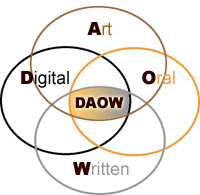 are crucial for personal, academic and workplace success in the Digital Age and blend very well in a digital storytelling environment. In my digital storytelling workshops we address how oral and written storytelling, as well as storytelling using digital and art skills, are involved in the creation of digital stories, and how all these literacies and forms of storytelling can reinforce each other. This improves literacy and expression in all areas."
are crucial for personal, academic and workplace success in the Digital Age and blend very well in a digital storytelling environment. In my digital storytelling workshops we address how oral and written storytelling, as well as storytelling using digital and art skills, are involved in the creation of digital stories, and how all these literacies and forms of storytelling can reinforce each other. This improves literacy and expression in all areas."I think Jason's article fits perfectly into the theme of "Technology Integration" that we've been exploring during this class. His article talks about how all of the components, not just digital are important, and it is the fusion of them all that makes them so impactful.
Teachers can also use digital stories to add dimension to classroom lecture. Often times certain ideas are best "seen" that is why you have science labs. Now without the long time consuming process of a lab, teachers can create short digital stories and have the students visualize something right in the middle of a quick lecture.
"Research has shown that the use of multimedia in teaching helps students retain new information as well as aids in the comprehension of difficult material."Educational Uses for Digital Storytelling
Wednesday, July 23, 2014
Documentary Blog
Questions for Thought:
1. Compare and Contrast each documentary. What was similar or different from the first one Digital Nation filmed in 2010 to Generation Like filmed in 2014 ?
2. Your thoughts on multitasking. Do you agree? Can you multitask? Do you disagree with the video on the topic of multitasking? What do you think our students think about multitasking today?
3. Is there an addiction happening in society today with technology or is it just a new way of living? Should we be concerned?
4. Do video games serve a purpose in education or are they a waste of time?
5. How did what you watched in the two videos support your feelings about technology or how did it change your views?
6. Are kids and adults today ruining their digital footprints by sharing too much information online without realizing that it may be detrimental to their future? Should they care? Are they focused on too much of what others think?
1. Compare and Contrast each documentary. What was similar or different from the first one Digital Nation filmed in 2010 to Generation Like filmed in 2014 ?
2. Your thoughts on multitasking. Do you agree? Can you multitask? Do you disagree with the video on the topic of multitasking? What do you think our students think about multitasking today?
3. Is there an addiction happening in society today with technology or is it just a new way of living? Should we be concerned?
4. Do video games serve a purpose in education or are they a waste of time?
5. How did what you watched in the two videos support your feelings about technology or how did it change your views?
6. Are kids and adults today ruining their digital footprints by sharing too much information online without realizing that it may be detrimental to their future? Should they care? Are they focused on too much of what others think?
7. What do you feel are the dangers of technology use? Are there any?
1. Those were two great documentaries, if I was going to share one video, I would have to give the edge to Digital Nation. Digital Nation was all encompassing. It touched on technology in education, personal life, and business. It left a lot of information out there for you to think about, pros and cons for each. I thought Generation Like was good, but it was more on the commercial side of technology, and impacts that social media can have on personal life outside of the classroom. It would be a great video to show students, about the affects it can have, both positive and negative.
2. I love when people bring up this topic of multi-tasking, because it is such a varied subject and people have all these weird thoughts and feelings about it. Here are a few of mine in bullet format
- in a work or school environment you can't do two things simultaneously that involve a thought process….you may be able to drink a glass of water and think about what you're going to do next but thats about it!
- among my co-workers I always felt that there were two types of personalities, those who got aggravated when asked to put one thing down and do something else before the other task was completed, and those who had an "easygoing attitude" that could prioritize and move on.
- Whether you are the type that gets aggravated or not, it is definitely not faster to do try and share your time between two things.
- but…….there is something to be said for people who use there time wisely. If there is any down time while doing one task, it is much more productive to work on another task that you can chip away at.
I'm not too involved in the classroom currently, so I don't know if when talking about multitasking students are referring to starting on their homework for one class while still in another class? or are students today talking about multitasking classwork and their personal life via cellphone use?? I used to do the first type all the time, and thought it was beneficial. I don't think student athletes could handle the work load if they didn't. Like one student said in the video "if there were only 27 hours in the day, I could read Hamlet". This type of multitasking doesn't really take any type of technology to do though?? I think the social media part would lead back to digital citizenship and teaching students proper etiquette.
3. Technology can be addictive, the piece on video gaming in South Korea was kind of scary. Now I don't feel so bad when my kids play on the iPad for an hour or so. I feel that those are extreme circumstances though and gaming technology is no more dangerous than any of other vice out there. I don't think we need to be too concerned, technology is just a new way of living. At least in my house current technology has just replaced older technology. Instead of junk t.v., its Facebook, games, and youtube! Instead of coloring on paper all the time its coloring of creating on the iPad. As long as limits are in place, and things are done in moderation everything will remain in balance.
4. Video games can be very educational. Even ones that don't seem educational, i.e. "first person shooters" like the ones in the interactive army recruitment stations, can teach problem solving skills and teamwork lessons. I would rather have my children playing a video game than watching certain cable television shows filled with commercials and pointless story lines.
6. I think that when certain social media sites first became popular, they may have been considered taboo. Companies may have looked at and used them to unfairly discipline their employees. Now those sites are so mainstream and companies realize how beneficial they can be to their bottom lines, I don't think the same stigma occurs. In fact they certain sites have become so important with professional networking, that if you don't have an account you may be frowned upon for not being tech savvy enough. That being said if your posting inappropriate things online its probably not the best choice, lets teach that Digital Citizenship.
7. Technology of course has dangers, but everything in life does. Lets not be the person who stays inside all day because they're too scared to cross the street! We just need to be aware of them, talk about them, and plan for the best prevention possible.
5. There was a couple segments in the documentaries that really intrigued me and made me stop contemplate a little longer.
The first was the comparison between the MIT professors in the beginning of the film who said students were falling behind because of technology. You had one of the professors saying that if the students had been listening to his lecture and reading the assigned readings they should have no problems absorbing the material. Then compare that to when Marc Prensky of "Games2Train" is later describing how in todays educational sentence, the verbs should be staying constant it is the nouns that should be changing. It was once books/papers that were the nouns and now it is moving towards digital tools like video/podcast being the nouns. Are these MIT professors a sign of the "Old Style" just too stubborn to change or are they right??
The second, was how technology has somehow made the students lose the ability to write fluidly. At one point in "Digital Nation" there are students sitting around all agreeing that professors had critiqued their papers for being to chopped up into very specific paragraphs. I myself am sitting here trying to piece back together my notes that I was typing while watching the film, and trying to answer all the questions. Its looking pretty choppy… Is it technology's fault? Is it a bad thing? At one point in the film a professor was saying that way back in world history before written words and books, storytelling was a strength of the people. Then came written words, and the art of storytelling was lost(or maybe just not as good as it once was), people were able to write the stories down in books. Were books a bad thing? Has technology changed the way we write? I have always preferred science, maybe it just isn't a strength.
One of the topics that I did not agree with completely was when the documentary started following the IBM workers and how they telecommuted and video conferenced everything. It seemed like they were completely happy with it and these virtual avatars enabled them to connect socially. They seemed to be complementing clothing choices and making jokes. I just don't think, in a business or educational setting, you can get the same thing from a virtual world as you can from a face to face setting. There are so many little nuances that when you're talking to someone in person you can pick up on. There is too many times to count, where I've been working with a co-worker or even talking to my kids where I've asked if they understand something and they say "yes", when all over their face I can see that it is really a "no".
The last thing I would like to mention, just because it left me in awww, was the part about todays military and drone strikes. First a thank you to our military and the people that serve. The part about the soldier sitting in Arizona using a drone to drop a bomb in Afghanistan, then driving home to have dinner with his family an hour later. I guess I never knew or thought about it long enough, I always assumed that the drones were being controlled at some military base closer to the conflict area, by soldiers who were deployed and "in" a combat mental state all the time. To realize that mentally some soldiers are going from drone strikes to reading bed time stories in the same day…that just kind of made me stop a think.
Reflection on Digital Citizenship
Digital Citizenship. If you work or play in today's online world, you are a digital citizen. It doesn't matter what country or continent you live in, online we are all one large community.
I liked this quote from "The importance of teaching digital citizenship" article
"Often we invoke the word "citizenship" in terms of our rights - our rights to privacy and to free speech, for example. But citizenship is also about responsibilities - responsibilities to maintain, to protect, and to enhance the community in which we live."
Digital citizenship skills need to be taught collectively at home and at our schools as soon as children start using the internet. As time goes by, and this current digital generation will be exposed to "digital etiquette", it will become one and the same as etiquette and we will no longer need the "digital". It is vitally important that our children get reinforcement in both area's of their life, at school at at home. Just like the basics of reading and mathematics. If students are not reading at home or getting reinforcement from they're family, they will probably struggle in school. I think the internet is the same, if students are not being checked on or taught to have appropriate behavior at home, then all the hard work put in at the schools will be mostly negated.
I was surprised by the statistic that 13% of students say they've been bullied online and 31% say they've been bullied face to face (PewResearchInternetProject) That statistic makes me wonder if students are more threatened by one over the other. My instincts would say that online bullying is more detrimental and maybe that 13% means more then just 13%. I know at my daughter's school they teach the kids certain steps on how to handle bullying. (to ignore, ask politely, ask assertively, and then talk to a teacher). I don't think I've seen a step by step guide for cyber-bullying? maybe my kids just aren't old enough yet? We've been teaching/talking about face to face bullying for years, how many years have we been talking about cyber-bullying?
I would break the 9 elements of digital citizenship into these groups.
K-5
- Digital Access
- Digital Literacy
- Digital Communication
- Digital Etiquette
- Digital Health & Wellness
- Digital Security
- Digital Rights & Responsibility
- Digital Commerce
- Digital Law
Check out this website at CommonSenseMedia for teaching Digital Citizenship. It seems to be a very comprehensive curriculum layout.
Teaching or reviewing digital citizenship skills to students should be proportional to the size of the lesson. If it is a quick lesson, there should be a quick reminder about what is and isn't appropriate online. These small, frequent reminders are what builds the strong foundation for good digital citizenship skills later in school and life when they will be doing longer projects and spending more time online.
I was surprised/scared slightly by the video piece on digital footprints. I am totally one of the people that just selects "agree" to the terms and conditions. I feel slightly powerless about the whole thing. Its not like you can get away from Google, or email, or credit reports now a days. So how do you keep it out. I guess you just have to accept it. I have enrolled in a "credit check monitoring" program for the last three years. I couldn't tell you if its a waste of money or not, luckily I haven't had to use it or received any alerts, but in today's world I felt it was kind of like car or life insurance….just one of those things you need to have. That reminds me, the next thing I need to start using is a password management system/software....Any recommendation??
Wednesday, July 9, 2014
Blogger Review
Maria Knee blogs with her kindergarten class at http://thekinderkids.edublogs.org/. "A Skype Call to Afghanistan" was one of the last blogs of the year the class did. During this blog there was a video of the class talking to an Australian soldier via Skype, they then read a children's story about how families long ago used to bake these special cookies for their soldiers, and then they tried to bake cookies and send them over to the soldier they spoke with along with some pictures the drew. I thought this was a great way to introduce the class to a current technology that many students probably use or could use at home to connect with loved ones. Whether it be someone they know in the military, a grandparent, or a parent away on a business trip. I had never heard of Anzac biscuits or been exposed to the Google slides application prior to this blog. Pedagogically speaking this was a great example of how a teacher can weave together current technology, classic read aloud story telling, and a hands on activity that the kids could get actively involved in. I liked that this blog was not really the teacher's personal opinion on how she liked to use technology in the classroom but more of a working example. That way many people benefit, the students who have a hand in many of the posts, the parents can actively participate, and other teachers or educational professionals can get ideas and use ideas for their own class. This site is managed or run through http://edublogs.org/. I have no previous experience with this company but feel that the website was very easy to follow. There was lots of links and information on the side bars. I think Maria does a wonderful job at demonstrating technology in action at the kindergarten level.
Jeff Utecht blogs at http://www.jeffutecht.com/. "I'm being pulled to Google+" was the perfect blog to read at this point in the course! Chapter 2 was all about developing a connected learning model, and Jeff introduces us to some great tools in starting your own PLN. I had never heard of Google+, I logged on and browsed some of the post. I linked to an "Artifacts Teach", website that seemed similar to the webquests that we are starting to work on. There was also a free PDF file on using Blogs as web-based portfolios, which I had seen on Maria's class blog at http://thekinderkids.edublogs.org/. I thought Jeff's website was very "infotaining", it definitely grabbed my attention, and had lots of links and information to share not just about education but life in general. I think this type of blog is one that you could pull up and read daily, for fun even if you were not vested in it directly...while the first blog I talked about not so much. Jeff's blog is a great way to show that if you make information entertaining, or put a little creativity behind it, it may just be the best way to get people to learn or stay engaged long enough to get your idea across. Technology makes this happen and it is an idea that you can take into the classroom to better engage students and keep them learning or coming back again wanting to learn on a daily basis.
Richard Byrne blogs at http://www.freetech4teachers.com/. "The Antarctic Food Web Game" was another blog that fit in well with what we were doing in class. The game, which had an "ocean" theme, was create and hosted by PBS and is very similar to the webquest I would like to create for our class project. Students read about food chains and food webs, how they are used in science, and how the are created. They then got the chance to create a food web with previously selected animals that were in the side bar. The one major difference between this "game" and our webquest is that all the information for the game seemed to be on the site itself, it did not have any links to other informational sites. This may be a better format for a younger group of kids then I am targeting.
Richard's website was packed with tabs and links to resources he felt were beneficial. One of my favorites was
http://www.docstoc.com/docs/66326425/The%20Super%20Book%20of%20Web%20Tools%20for%20Educators
He also seemed to have a large portion of his web page taken up by ads, which I did not like. I feel that when you have ads so prominent on your web site you lose a little bit of trust from your audience. They start to feel as if your opinion can be swayed by money and whether or not you truly feel this is beneficial to your readership. I'm not sure what the prerequisites are for advertising on his site but there seemed to be quite a few.
Richard's blog was a great way for educators like myself to search out information that will help us integrate technology into the classroom. The link I provided above was a great tool for me as a teacher with little experience, in helping me focus on what new tools or programs I should learn first. With so much out there it can be a little overwhelming, you get the feeling of "I don't even know where to begin!"
Jeff Utecht blogs at http://www.jeffutecht.com/. "I'm being pulled to Google+" was the perfect blog to read at this point in the course! Chapter 2 was all about developing a connected learning model, and Jeff introduces us to some great tools in starting your own PLN. I had never heard of Google+, I logged on and browsed some of the post. I linked to an "Artifacts Teach", website that seemed similar to the webquests that we are starting to work on. There was also a free PDF file on using Blogs as web-based portfolios, which I had seen on Maria's class blog at http://thekinderkids.edublogs.org/. I thought Jeff's website was very "infotaining", it definitely grabbed my attention, and had lots of links and information to share not just about education but life in general. I think this type of blog is one that you could pull up and read daily, for fun even if you were not vested in it directly...while the first blog I talked about not so much. Jeff's blog is a great way to show that if you make information entertaining, or put a little creativity behind it, it may just be the best way to get people to learn or stay engaged long enough to get your idea across. Technology makes this happen and it is an idea that you can take into the classroom to better engage students and keep them learning or coming back again wanting to learn on a daily basis.
Richard Byrne blogs at http://www.freetech4teachers.com/. "The Antarctic Food Web Game" was another blog that fit in well with what we were doing in class. The game, which had an "ocean" theme, was create and hosted by PBS and is very similar to the webquest I would like to create for our class project. Students read about food chains and food webs, how they are used in science, and how the are created. They then got the chance to create a food web with previously selected animals that were in the side bar. The one major difference between this "game" and our webquest is that all the information for the game seemed to be on the site itself, it did not have any links to other informational sites. This may be a better format for a younger group of kids then I am targeting.
Richard's website was packed with tabs and links to resources he felt were beneficial. One of my favorites was
http://www.docstoc.com/docs/66326425/The%20Super%20Book%20of%20Web%20Tools%20for%20Educators
He also seemed to have a large portion of his web page taken up by ads, which I did not like. I feel that when you have ads so prominent on your web site you lose a little bit of trust from your audience. They start to feel as if your opinion can be swayed by money and whether or not you truly feel this is beneficial to your readership. I'm not sure what the prerequisites are for advertising on his site but there seemed to be quite a few.
Richard's blog was a great way for educators like myself to search out information that will help us integrate technology into the classroom. The link I provided above was a great tool for me as a teacher with little experience, in helping me focus on what new tools or programs I should learn first. With so much out there it can be a little overwhelming, you get the feeling of "I don't even know where to begin!"
WebQuest Idea
Webquest
"Help, Aquatic Scientists Needed!" a local aquarium has had a terrible accident! Their tanks have broken and released all the animals into the local bay. They need all the help they can get with identifying and grouping the species. Then we need to decide what type of environment they live in so we can bring them back to their original ecosystems as soon as possible. You'll break up into small teams and each take a specific subgroup to work on. After you have located each animal in your group, you will have to figure out what type of ecosystem they thrive in so we can return them home.
I am creating a webquest which has 4th grade students classifying different aquatic animals in groups and bringing them to the correct ecosystem so they can survive. (i.e. fresh/salt water, cold/warm water, mammals/fish/crustaceans things they may see at an aquarium that they would visit....)
I am currently seeking my Med. Elementary Education, and I hope to teach in 3rd-5th grade.
I didn't get my idea from any particular webquest already made, I received my undergraduate degree in Marine Science, so this "area of interest" has always been exciting to me. When I was researching curriculum guidelines and lesson plans for 3rd-5th grade, I just decided that these two ideas (Aquarium/ Species Classifications) would work well together because there is such a wide range of animals at an aquarium.
I would like for the students to get an understanding of how to sort/classify different living things, based on identifiable structures and characteristics, and how these characteristics would help them survive in different habitats/ecosystems. This fits into the NH Frameworks for Science Literacy 3-4 grade expectations.
I would like my students to use computers/provided links to aquariums, state fish and game sites, wikipedia, etc... for researching the animals and where they live, and fill out tables/charts provided by me to help them organize all their information they gather.
Life Science
LS 1 - All living organisms have identifiable structures and characteristics that allow
for survival (organisms, populations, & species).
1. CLASSIFICATION
1) Recognize and identify the various ways in which living things can be grouped.
2) Sort/classify different living things using similar and different characteristics. Describe why organisms
belong to each group or cite evidence about how they are alike or not alike. [LS1 (K-4) INQ+POC –1]
2. LIVING THINGS AND ORGANIZATION
1) Recognize that living organisms have certain structures and systems that perform specific functions,
facilitating survival, growth and reproduction.
2) Identify and describe the function of the plant structures responsible for food production, water transport,
support, reproduction, growth and protection.
3) Identify and explain how the physical structures of an organism (plants or animals) allow it to survive in its
habitat/environment (e.g., roots for water; nose to smell fire). [LS1 (K-4) FAF –4]
4) Identify the basic needs of plants and animals in order to stay alive (i.e., water, air, food, space). [LS1 (K-
http://www.education.nh.gov/instruction/assessment/necap
"Help, Aquatic Scientists Needed!" a local aquarium has had a terrible accident! Their tanks have broken and released all the animals into the local bay. They need all the help they can get with identifying and grouping the species. Then we need to decide what type of environment they live in so we can bring them back to their original ecosystems as soon as possible. You'll break up into small teams and each take a specific subgroup to work on. After you have located each animal in your group, you will have to figure out what type of ecosystem they thrive in so we can return them home.
I am creating a webquest which has 4th grade students classifying different aquatic animals in groups and bringing them to the correct ecosystem so they can survive. (i.e. fresh/salt water, cold/warm water, mammals/fish/crustaceans things they may see at an aquarium that they would visit....)
I am currently seeking my Med. Elementary Education, and I hope to teach in 3rd-5th grade.
I didn't get my idea from any particular webquest already made, I received my undergraduate degree in Marine Science, so this "area of interest" has always been exciting to me. When I was researching curriculum guidelines and lesson plans for 3rd-5th grade, I just decided that these two ideas (Aquarium/ Species Classifications) would work well together because there is such a wide range of animals at an aquarium.
I would like for the students to get an understanding of how to sort/classify different living things, based on identifiable structures and characteristics, and how these characteristics would help them survive in different habitats/ecosystems. This fits into the NH Frameworks for Science Literacy 3-4 grade expectations.
I would like my students to use computers/provided links to aquariums, state fish and game sites, wikipedia, etc... for researching the animals and where they live, and fill out tables/charts provided by me to help them organize all their information they gather.
Life Science
LS 1 - All living organisms have identifiable structures and characteristics that allow
for survival (organisms, populations, & species).
1. CLASSIFICATION
1) Recognize and identify the various ways in which living things can be grouped.
2) Sort/classify different living things using similar and different characteristics. Describe why organisms
belong to each group or cite evidence about how they are alike or not alike. [LS1 (K-4) INQ+POC –1]
2. LIVING THINGS AND ORGANIZATION
1) Recognize that living organisms have certain structures and systems that perform specific functions,
facilitating survival, growth and reproduction.
2) Identify and describe the function of the plant structures responsible for food production, water transport,
support, reproduction, growth and protection.
3) Identify and explain how the physical structures of an organism (plants or animals) allow it to survive in its
habitat/environment (e.g., roots for water; nose to smell fire). [LS1 (K-4) FAF –4]
4) Identify the basic needs of plants and animals in order to stay alive (i.e., water, air, food, space). [LS1 (K-
http://www.education.nh.gov/instruction/assessment/necap
Wednesday, July 2, 2014
Using Technology to Personalize Learning in Elementary Schools October 15th, 2013

Matthew Renwick(Principal, Howe Elementary School, Wisconsin Rapids Wisconsin), Ben Wilkoff (Co-Director of Blended Learning in the Denver School District, Denver Colorado), and a representative from Dreambox learning, created this webinar to discuss how the advancements in digital technology have created new ways that classrooms, schools, and districts can improve an individual's educational path, and ultimately a student's/school's performance as a whole. During the webinar they discuss the benefits of a blended learning environment(using traditional methods and new emerging technologies) but also make a point of the key to success is not just about adding more and more technology and then saying that you have a blended classroom, but its more about proper assessment and proper planning so technology can be implemented in its most efficient way and create a person's individual learning path. Every student, every school, every district has their own individual needs, and its imperative that they choose what to bring into the classroom as part of their technology integration. Differentiation is key!
They talk about how teachers can use new technology in simple ways to help with formative assessment, and then take this real-time data to create adaptive learning paths for individual students. One of the example they use is a kindergarten class whose students are working on the life cycle of a butterfly. The teacher was using an ipad to document each student's work in their own e-portfolio by taking a picture and an audio clip of the students own description of their work. The example shows three different student's "work", all three understanding the concept of the life cycle but working in different ways. One student had colored and written words about the cycle, one student had cut out pictures and pasted them in a correct order, and another had used pasta to create the different steps. The purpose of the example, was two fold, that the teacher had given all the students the option to choose how they wanted demonstrate their understanding. If she had asked them all to draw and write about it, some of the students may not have felt like they succeeded or would not have been as "engaged" long enough to learn the outcome. The second purpose was to show that with technology, documenting and archiving a students work for later reflection and lesson planning is much more efficient in today's classroom. That student can then immediately take their work home, when their parents ask what they did at school today, they have something to show and be proud of.(I feel like a lot of the time, projects that my daughter brings home were done weeks before and she's usually lost interest in telling me about them). The parents can be proud, give encouragement, feel good about the education their child is receiving. The teacher still has the ability to look back over all the students work electronically and doesn't need to store 25 students artwork, and have to worry about the logistical side of taking home all the stuff to accurately grade/reflect/and plan the next lesson or the next step in that student's particular path. The logistical step alone saves time, and allows the teacher to more accurately assess their classes' needs and plan lessons that connect with all their students. This positive loop of student engagement, and effective assessment then kind of snowballs and shows how technology can help create positive change in our classrooms.
This example is a great way of showing what technology in the hands of a kindergarten teacher looks like, but also leads us to how every class needs to make their own decisions because technology in kindergarten will be different then technology in the hands of a 5th grade science teacher. In 5th grade it may be more beneficial to have a 1:1 computer ratio and students personalizing their own lessons and the teacher is in more of a advisor/class manager role, making sure outcomes are met but allowing students a little more flexibility with where they're at on their own educational path. This difference is ultimately the schools and teachers choice, and needs to be planned out accordingly so they feel their needs are being met.
I do not currently teach, but my goal is to become an elementary school teacher preferably (4th or 5th grade). I could not imagine, trying to get 25 students to all do the same thing the same way. I have managed people in the retail setting for the past 10 years, these are adults that are getting paid! and that would be impossible, well it may be possible but not a best practice. 80% of the employees would be disgruntled and turnover would be terrible... And then forget about just getting them to do things the same way, everyone enjoys learning a different way, so you have to be flexible and adaptive. We need to remember, as long as the outcome is met it doesn't really matter how we got there, (scratch that it does matter! if the students enjoy getting to the outcome then continual engagement, growth and success of the learner will increase dramatically). To engage everyone you need to realize everyone is different, you need to make a personal connection, find out their strengths and weaknesses, ask them "what they enjoy doing?" "what they feel like they can improve on?" and give them time each day to excel at their strengths and work on their weaknesses. I can see how without the speed and ease of technology, engaging so many different types of students would be extremely difficult. In the retail business it was easy to setup training in (1 to 1) environments, but that's not really possible in school, with the teacher as the center of the classroom model,(1 to 25) if your lucky. I can see why today's classrooms struggle. I would try and use the availability and self-directed aspects of different materials and techniques via the internet to try and have students personalize some of their lessons and maximize engagement. Below is an introduction to Dreambox and how its software can help develop personalized lesson plans. Dreambox is also a sponsor of the webinar.
During the webinar a large emphasis was also put on a connected school community, that only through a system of supportive communication, collaboration and sharing can school systems turn "good practice" into "best" practice.
"Meaningful collaboration and collegiality are forces that can bring about the kind of shift we all are seeking in schools today---a shift that connects and engages us as educators, supports and sustains us, and helps us enrich our students' lives and accelerate their achievement" (The Connected Educator, Beach/Hall 2012)
I feel that webinars are an incredible way to create this important collaboration and sharing system. When you think of "seminars", they are presentations given to large groups of people, usually in a large room or auditorium, in order to share information that you feel is educational or beneficial. Now increase the access to that seminar exponentially and you have webinar...available to a world full of people not just a room, They are a system of sharing of information that is easy tap into, no more marking the calendar, having to attend them on the weekends or evenings. You can start and stop them when you please, and share them easily, within your connected community.
This has been my first class of graduate school, and I have been exposed to a lot of this emerging technology for the first time. Webinars being one of them, but I also researched some webquests in preparation for next week. This webinar on personalized learning and webquests seem to go perfectly together, and would be something I would use in my classroom if currently teaching. The teacher can set up a webquest with a certain outcome or educational goal in mind, students then can personalize it, research/learn on a path that works best for them.

"Course Learner Outcomes" that this webinar was most pertinent too, were #2 Learn ways to promote student reflection using collaborative tools to reveal and clarify students conceptual understanding and #6 Evaluate and reflect on emerging tools and trends by reviewing current research and professional literature.
The example the Ben Wilkoff gave of the Kindergarten teacher recording and clarifying how the three different students each achieved conceptual understanding of the butterfly life cycle but each in their own personalized way was a great example of outcome #2, and really hit home with me on how technology can and should be used in schools today. It is something I will take with me into the classroom.
Being exposed to a webinar in general was perfect for outcome #6, webinars are an emerging tool for teacher personal development, during the webinar I also put together a small list of books to read for further research and professional growth. The presenters recommended reading "World Class Learners" by Yong Zhao (Corwin, 2012), and "Visible Learning" by John Hattie (Routlege, 2009). This is a small start to creating and joining a connected educational community.
This webinar was very informative, and made you reflect on not only the benefits of personalized learning but also the challenges that schools face. Differentiated instruction or Personalized learning, no matter how you describe it, is important. Technology can and will be the teachers best way to make it happen.
Matthew Renwick blogs at Reading by Example.
Ben Wilkoff blogs at Learning is Change.
Matthew Renwick(Principal, Howe Elementary School, Wisconsin Rapids Wisconsin), Ben Wilkoff (Co-Director of Blended Learning in the Denver School District, Denver Colorado), and a representative from Dreambox learning, created this webinar to discuss how the advancements in digital technology have created new ways that classrooms, schools, and districts can improve an individual's educational path, and ultimately a student's/school's performance as a whole. During the webinar they discuss the benefits of a blended learning environment(using traditional methods and new emerging technologies) but also make a point of the key to success is not just about adding more and more technology and then saying that you have a blended classroom, but its more about proper assessment and proper planning so technology can be implemented in its most efficient way and create a person's individual learning path. Every student, every school, every district has their own individual needs, and its imperative that they choose what to bring into the classroom as part of their technology integration. Differentiation is key!
They talk about how teachers can use new technology in simple ways to help with formative assessment, and then take this real-time data to create adaptive learning paths for individual students. One of the example they use is a kindergarten class whose students are working on the life cycle of a butterfly. The teacher was using an ipad to document each student's work in their own e-portfolio by taking a picture and an audio clip of the students own description of their work. The example shows three different student's "work", all three understanding the concept of the life cycle but working in different ways. One student had colored and written words about the cycle, one student had cut out pictures and pasted them in a correct order, and another had used pasta to create the different steps. The purpose of the example, was two fold, that the teacher had given all the students the option to choose how they wanted demonstrate their understanding. If she had asked them all to draw and write about it, some of the students may not have felt like they succeeded or would not have been as "engaged" long enough to learn the outcome. The second purpose was to show that with technology, documenting and archiving a students work for later reflection and lesson planning is much more efficient in today's classroom. That student can then immediately take their work home, when their parents ask what they did at school today, they have something to show and be proud of.(I feel like a lot of the time, projects that my daughter brings home were done weeks before and she's usually lost interest in telling me about them). The parents can be proud, give encouragement, feel good about the education their child is receiving. The teacher still has the ability to look back over all the students work electronically and doesn't need to store 25 students artwork, and have to worry about the logistical side of taking home all the stuff to accurately grade/reflect/and plan the next lesson or the next step in that student's particular path. The logistical step alone saves time, and allows the teacher to more accurately assess their classes' needs and plan lessons that connect with all their students. This positive loop of student engagement, and effective assessment then kind of snowballs and shows how technology can help create positive change in our classrooms.
This example is a great way of showing what technology in the hands of a kindergarten teacher looks like, but also leads us to how every class needs to make their own decisions because technology in kindergarten will be different then technology in the hands of a 5th grade science teacher. In 5th grade it may be more beneficial to have a 1:1 computer ratio and students personalizing their own lessons and the teacher is in more of a advisor/class manager role, making sure outcomes are met but allowing students a little more flexibility with where they're at on their own educational path. This difference is ultimately the schools and teachers choice, and needs to be planned out accordingly so they feel their needs are being met.
I do not currently teach, but my goal is to become an elementary school teacher preferably (4th or 5th grade). I could not imagine, trying to get 25 students to all do the same thing the same way. I have managed people in the retail setting for the past 10 years, these are adults that are getting paid! and that would be impossible, well it may be possible but not a best practice. 80% of the employees would be disgruntled and turnover would be terrible... And then forget about just getting them to do things the same way, everyone enjoys learning a different way, so you have to be flexible and adaptive. We need to remember, as long as the outcome is met it doesn't really matter how we got there, (scratch that it does matter! if the students enjoy getting to the outcome then continual engagement, growth and success of the learner will increase dramatically). To engage everyone you need to realize everyone is different, you need to make a personal connection, find out their strengths and weaknesses, ask them "what they enjoy doing?" "what they feel like they can improve on?" and give them time each day to excel at their strengths and work on their weaknesses. I can see how without the speed and ease of technology, engaging so many different types of students would be extremely difficult. In the retail business it was easy to setup training in (1 to 1) environments, but that's not really possible in school, with the teacher as the center of the classroom model,(1 to 25) if your lucky. I can see why today's classrooms struggle. I would try and use the availability and self-directed aspects of different materials and techniques via the internet to try and have students personalize some of their lessons and maximize engagement. Below is an introduction to Dreambox and how its software can help develop personalized lesson plans. Dreambox is also a sponsor of the webinar.
During the webinar a large emphasis was also put on a connected school community, that only through a system of supportive communication, collaboration and sharing can school systems turn "good practice" into "best" practice.
"Meaningful collaboration and collegiality are forces that can bring about the kind of shift we all are seeking in schools today---a shift that connects and engages us as educators, supports and sustains us, and helps us enrich our students' lives and accelerate their achievement" (The Connected Educator, Beach/Hall 2012)
I feel that webinars are an incredible way to create this important collaboration and sharing system. When you think of "seminars", they are presentations given to large groups of people, usually in a large room or auditorium, in order to share information that you feel is educational or beneficial. Now increase the access to that seminar exponentially and you have webinar...available to a world full of people not just a room, They are a system of sharing of information that is easy tap into, no more marking the calendar, having to attend them on the weekends or evenings. You can start and stop them when you please, and share them easily, within your connected community.
This has been my first class of graduate school, and I have been exposed to a lot of this emerging technology for the first time. Webinars being one of them, but I also researched some webquests in preparation for next week. This webinar on personalized learning and webquests seem to go perfectly together, and would be something I would use in my classroom if currently teaching. The teacher can set up a webquest with a certain outcome or educational goal in mind, students then can personalize it, research/learn on a path that works best for them.
"Course Learner Outcomes" that this webinar was most pertinent too, were #2 Learn ways to promote student reflection using collaborative tools to reveal and clarify students conceptual understanding and #6 Evaluate and reflect on emerging tools and trends by reviewing current research and professional literature.
The example the Ben Wilkoff gave of the Kindergarten teacher recording and clarifying how the three different students each achieved conceptual understanding of the butterfly life cycle but each in their own personalized way was a great example of outcome #2, and really hit home with me on how technology can and should be used in schools today. It is something I will take with me into the classroom.
Being exposed to a webinar in general was perfect for outcome #6, webinars are an emerging tool for teacher personal development, during the webinar I also put together a small list of books to read for further research and professional growth. The presenters recommended reading "World Class Learners" by Yong Zhao (Corwin, 2012), and "Visible Learning" by John Hattie (Routlege, 2009). This is a small start to creating and joining a connected educational community.
This webinar was very informative, and made you reflect on not only the benefits of personalized learning but also the challenges that schools face. Differentiated instruction or Personalized learning, no matter how you describe it, is important. Technology can and will be the teachers best way to make it happen.
Matthew Renwick blogs at Reading by Example.
Ben Wilkoff blogs at Learning is Change.
Subscribe to:
Comments (Atom)