Wednesday, August 20, 2014

Final Reflection
Well the end of EDU-533 is upon us... This week we've completed our WebQuests!, and stop for final reflection on our course outcomes and objectives.
Objective #7
It is imperative that we start using technology in schools to help our students achieve more. Technology makes things easier....... We use it in every other facet of life, (maybe not if you're Amish) we shouldn't let our education system be any different. It needs to be in school from K-12.
Through our textbook, but also along with class I have slowly started to build my Personal Learning Network. I have slowly introduced a handful of bloggers that I follow to keep abreast of the latest and greatest tech for teachers. I've created my own diigo account, how ever small it is, I can still give back to my digital community a little if they find my diigo pages interesting. I also have a few created a few personal community connects from my childrens' teachers at the local elementary school. The most important thing though is that I've taken the first step. I've learned that creating you PLN is not easy, it takes a long time, and hard work. You have to put in a great deal of energy if you wish to take out a great deal.
Objective #7
Turn theory into practice by completing 5 hours of related field experience.
This objective was met through, an interview with someone who actively integrated technology into the classroom. My Interview was with Jeff Utecht. I posted my interview questions and responses in last week's blog and I almost feel as though that was a final reflection in and of itself. Jeff touched on so many things that we had covered in the course, I'm still kind of shaking my head.... Did I ask great questions? Did he just have AWESOME answers? I think it was the latter....
Objective # 2
Learn ways to promote student reflection using collaborative tools to reveal and clarify students' conceptual understanding
This learning outcome was met through a few web2.0 tools that we used in the final weeks. One was digital storytelling, we used a web tool called Animoto to complete a lesson plan that made us think about the task at hand and then "show what we know" by telling a digital story through multiple mediums. Through visual images, audio or musical sounds, and text/words to go along with the pictures. We have also been blogging for the entire 10 weeks, which is probably the best way we can promote student reflection. It also has a small collaborative element too, when students are commenting on each others posts.
Objective #4
Illustrate through application how state and national standards are implemented within the curriculum.
The last three projects we worked on all had state and national curriculum requirements. The Digital Story, The I Am Poem, and our Webquests, all had requirements of posting at least two standards that were met by CCSS and ITSE NETS. Science Webquests also used GLE's if applicable. We also explore web tools like Rubistar and others that help teachers apply standards in an even and reproducible way, so that fairness for all students was evident.
Objective #5
Demonstrate an understanding of the use of assistive and adaptive technologies and other digital resources to personalize and differentiate learning activities for every student.
Last class we had a little round table discussion on a few of the assistive technologies that some fellow classmates had experienced in their schools. One example was the teachers who had audio amplification in their classrooms. Another was software that teachers could upload onto the computers that help students with the definitions of hard vocabulary words, simply by clicking on the word the definition comes up. Another program was one that helps students who have trouble reading, by reading aloud text that is highlighted and clicked. Both of these last examples were free programs through google.
"What is it we hope to accomplish and what’s stopping us?"
After taking this class and listening to classmates, I was kind of surprised by the vast differences in schools. Some having one to one, others having maybe only one computer room....(what is that? 1 to 50?) We can not let school or city budgets keep us from exposing kids to technology. We as teachers must find ways to get our kids involved with technology until our schools or cities catch up to the times. Most of our students have internet access at homes, we can make choices that allow them to use that technology if there is none available in our classrooms. Make the typical book report and Podcast with Audioboo. Create a google doc, where students can collaborate on a team project over the weekend. We need to find ways, complaining that your school doesn't support you does not help the students. Yes we need to voice our opinions but in the mean time we need to also support the students.Through our textbook, but also along with class I have slowly started to build my Personal Learning Network. I have slowly introduced a handful of bloggers that I follow to keep abreast of the latest and greatest tech for teachers. I've created my own diigo account, how ever small it is, I can still give back to my digital community a little if they find my diigo pages interesting. I also have a few created a few personal community connects from my childrens' teachers at the local elementary school. The most important thing though is that I've taken the first step. I've learned that creating you PLN is not easy, it takes a long time, and hard work. You have to put in a great deal of energy if you wish to take out a great deal.
Wednesday, August 13, 2014
Real World Technology Use


When I sat down to create my list of questions for our field interview, I had a current classroom teacher in mind. I was hoping to gain a more tech savvy perspective on what was currently going on in a well integrated classroom. I had visited that teacher’s classroom blog, and as I was crafting my questions, I was visualizing what the answers might be. Well, when I requested an interview the teacher never responded, so.... when I first contacted Jeff Utecht, I was worried that his answers might not mesh with what I had been visualizing. No need to worry, when I received Jeff’s responses, it seemed like each one fit perfectly with something we had touched upon in class or an assigned reading.
A brief background on Jeff Utecht. Jeff is currently an educational technology consultant. He started his career as an elementary teacher, and progressed to one of today's current leaders in the movement to integrate technology into our school systems, and the professional development plans of staff. His first book, “Reach” published in 2010, delivers a strong and passionate example of how technology can help people connect from around the globe, improving the student’s and the teacher’s educational journey.
Question #1. What is the best advice you can give to me, as a new elementary teacher, in regards to technology integration?
Easy....create a PLN (Personal Learning Network). Understand that the educational community on Twitter and Google+ is AMAZING and will be the best professional development you will ever get. I have attached a copy of my book...feel free to share it with everyone in your course.....on how to get started.
O.k., that makes since, I had been slowly creating my PLN, since day 1. It started with my Professor, and my Learning through Technology classmates. I uploaded my classmates' blogs into an RSS reader so I could easily view their posts, and I was slowly adding more and more as the weeks passed(Jeff Utecht, Maria Knee, Richard Byrne)…...this RSS feeder was a great way to gain information about how technology was changing our world as we know it, in and out of the classroom. This is my first class on the way to obtaining my teaching certificate, so having a steady feed of great blog sites with current tools and resources I will need throughout my career is a great first step.
“As mentioned earlier, I believe that RSS (Really Simple
Syndication) might just be the best tool that has emerged out of the
Web 2.0 revolution. I recommend starting to build your network
around an RSS reader. Using RSS, as discussed in Chapter One, also
allows you to create your personal learning network without joining a
community. No need to worry about your avatar (small icon picture
that comes with a community profile) or how and with whom you
should connect. Starting with an RSS reader and then moving into a
community of learners is my recommended process.” Reach, Jeff Utecht, 2010
Question #2. Is there one particular subject area(math, reading, science), that you feel the use of technology during lessons is more impactful or engaging to the students?
Nope....all of the above...and it will depend on what technology you have available with your students. Makes it tough in your pre-teaching program as you don't know what you'll have. I would say....constantly reflect on what you are teaching students and make sure they are the skills they need for THEIR FUTURE not our past.
Examples:
Teach digital maps not paper maps
Teach keyboarding not cursive
Teach how to write an email not a letter
Teach how to read a web page
These are skills that are for their future
Jeff’s response, touched on many things I had heard or seen during class. First off reflecting or visualizing what I will do when I first step into the classroom has been tough without knowing what types of "tech" hardware I will have at my disposal. The handful of teachers we have in EDU-533, seem to be spread out over a wide range. We have teachers who work at schools with one to one ratio’s and we have teachers with little or no "in" classroom tech, only computer labs that the students may visit a few times per week. The second would be constant reflection. We have discussed how teachers need to gather information from their own classes and share it with other teachers. Its only through this sharing and reflecting can we make meaningful changes. The things that were relevant in the past, the things that we grew up with, what and how we learned in school has changed. Teachers need to constantly reflect on what they are doing, and why are they doing it? Can it be done better? This quote is from one of our readings on "reinventing the wheel".
3. What is the one piece of technology or software application that is currently your favorite for home use and you would recommend for students in 1st-5th grade?
The Internet.....period. It is the most important app on any device and that alone changes learning. It's not about the software, it's about the learning! There is no "one piece of technology". We start with learning and work backwards from there.
This question and answer made me reflect on our discussions about Digital Citizenship. How it is our job as teachers to slowly introduce our students to the internet. Starting when in kindergarten we must build a strong foundation and build upon that each and every day. Teaching appropriate behavior online, just as we would teach appropriate behavior in class. Creating a safe atmosphere where kids can get on the internet, learn by investigating, exploring, and sharing with students in their school, across the country or across the world.
4. Do you feel that classroom blogs/websites have increased parental engagement?
Yes...and every student should have their own blog!
Maria Knee, who is a kindergarten teacher in Deerfield, NH, has an excellent example of how to effectively run a classroom blog. Every student has their own page, and gives them an outlet to express their thoughts, share their work, and start living in today’s world. The students get exposure to things they’ll experience at home, whether that is their parent sending off an email to work, reading the news off of their tablet, or perhaps Mom or Dad posting pictures of their latest vacation and sharing it with friends and siblings via social media. In the past sharing their schoolwork was a magnet on the refrigerator, today and in the future it will be uploaded onto the computer, into their blog, and shared via the internet.
5. Can you think of something that technology has replaced that you or your students miss?
???? Not sure I get this questions. We have to give something up if we're going to use technology.....what we give up is always hard...but this isn't new.....it's always been this way. Oral traditions went away with the book, paper is going away with the computer. Books are being replaced by the Internet. One technology always replaces the other...we need to learn to let go...it's ok.....we'll be OK.
I guess I was looking for a more personal answer here. Maybe not one that meant something big, or had some deep philosophical meaning. Myself, I kind of miss the written personal letter. I remember back to when I first started college, getting written letters in the mail was so exciting. Maybe, if technology allows the school to reduce the physical size of a school library it would make more room for actual classrooms, but would we then be nostalgic about that nice quiet room that had a distinctive paper smell?? I guess to Jeff's point, if we choose to go that route because extra classrooms would reduce the student to teacher ratio, we have chosen the option that is best for our future.
6. How have schools benefited the most from technology integration ?
When done correctly everyone ones. Learning increases, teacher time preparing lessons is reduced, we get to spend more time actively engaged in the learning process.
During class I had watched this webinar about differentiated learning, and was just amazed at some of the products that certain companies are putting out that can help develop individualized lesson plans. The webinar I watched was sponsored by Dreambox, and I know Jeff is involved with helping schools who want to bring Google Apps into their classrooms. I was so amazed at what computers can do and how fast they can do it. It reminds me of the computer “Watson”, that IBM created for Jeopardy, and how it could take little nuances from the questions and come up with the correct answers so quickly. IBM is now taking that technology into the medical field....how about the educational field? Dreambox talks about how they can adapt lesson plans as the student is working….. thats crazy! As the student is answering questions the software takes correct and incorrect answers and adapts the lesson plan on the spot....In years past a teacher may go through a whole unit, test the children, then reflect on their lesson plans, taking action much later, if not too late! Technology can now make sure that no student gets looked over, that each one gets an individualized lesson plan, and the teachers are there to help facilitate the learning , and when needed and can give individualized help… We are not talking about averages anymore….we are talking about exceptional.
7. Do you think technology will help bring down the cost of education? K-12? Colleges & Universities?
Not in K-12 but in University for sure! By 2025 we'll see a pretty different university system. Some traditional schools will remain but for the most part they will be different......better and more focused on what we know we need going forward. Problem finders as well as problem solvers.
Hope that helps,
Jeff
This last question, is a crucial point when talking about effectively getting schools to integrate technology. Every school seems to be operating on a strapped budget. How will all schools get this technology, and then even tougher is how will they be able to develop and train their faculty so they know how to effectively use this technology. It will probably cost lots of money, in which the schools don’t have. Teachers will have to take their professional development into their own hands. They’ll have to browse the web, listen to webinars, become familiar with tools they do currently have available in their schools. Like most teachers already do, they will have to bring their own resources in, camera or iPad for uploading images into class blogs, digital stories they have created at home. Unfortunately I see no easy answer for the financial hurdles ahead. Bill Gates delivered this TED talk on state budgets and education that feel everyone should see.
In final reflection, Jeff brought together all the things we have been working on in class perfectly. No this financial problem will not disappear. Teachers will have to create their own PLN’s and take professional development into their own hands and then bring what they learn to the students themselves. Technology has the most amazing potential, but it still needs to be driven by teachers who have an unquenchable passion for helping students learn. Once students have been taught how to “find problems and solve problems” they can help develop their own educational path. Each and every one of our students is different. It is now the standard for teachers in the 21st century to develop differentiated lesson plans that use contemporary tools for administering, assessing, and evaluating. The image that started this blog "Success", if you notice some of the essential building blocks that lead to success are; teach, innovation, invention, teamwork. All these things are important in today's classroom and will be important in our student's future.
Wednesday, August 6, 2014
Digital Story in Animo
I thought Animoto was a very well put together program. It was easy to upload pictures, add text below the pictures, or even title slides. It was very user friendly, you just click and drag the tiles where you want them to go. I was confused on how to cite my sources at the end though, I guess I should have thought about this step earlier in the process. When I was finding images and adding them to a file on my computer for uploading I thought the http:// address would still be there... it was not. This was me just not being very familiar with saving images. Trying to redo the images at the end seemed to daunting.... but then I was trying to think how I would site them even if I had them? Is the last slide in your story just a bunch of links to the websites? Even then it seemed like Animoto wouldn't allow large field's of text? Would you do more than one slide? That doesn't seem to be a very artistic way to end your slide show? Any hoo..I thought digital story telling would be a very fun thing for students to use in the classroom. The use of Animoto to tell a brief story about how the places I've lived have shaped my personality and life fit these standards.
ITSE NETS Student Standards
1. Creativity and innovation
Students demonstrate creative thinking, construct
knowledge, and develop innovative products and
processes using technology.
b. Create original works as a means of personal
or group expression
ITSE NETS Teacher Standards
1. Facilitate and inspire student learning
and creativity
Teachers use their knowledge of subject matter,
teaching and learning, and technology to facilitate
experiences that advance student learning,
creativity, and innovation in both face-to-face
and virtual environments.
a. Promote, support, and model creative
and innovative thinking and inventiveness
CCSS.ELA-LITERACY.W.4.3
Write narratives to develop real or imagined experiences or events using effective technique, descriptive details, and clear event sequences.
CCSS.ELA-LITERACY.W.4.3.A
Orient the reader by establishing a situation and introducing a narrator and/or characters; organize an event sequence that unfolds naturally.
Orient the reader by establishing a situation and introducing a narrator and/or characters; organize an event sequence that unfolds naturally.
CCSS.ELA-LITERACY.W.4.3.B
Use dialogue and description to develop experiences and events or show the responses of characters to situations.
Use dialogue and description to develop experiences and events or show the responses of characters to situations.
Use concrete words and phrases and sensory details to convey experiences and events precisely.
Puppet Pals
Puppet Pals seems like a great way for younger students to express their creativity via digital media. With this app, students pick out characters from the program, and add them to a pre-loaded backdrop. The students can then manipulate the images with their fingers while recording "the story" as they tell it. This is an apple application, and requires an iPad. Below is a short video tutorial.
Microsoft Photostory 3
Photostory 3 seems to be similar to Animoto, you can create slideshows with uploaded images from your own library or the web. There are many different editing tools, and you can add video or audio. This is a free application for use with PC's running windows. It can only be played back via windows media player. Below is a short video tutorial.
Digital storytelling is a great example of how new technologies have added to a classroom landscape that allows for more differentiated learning. When I was in school, extra curricular projects usually meant a poster, oral report, or the old shoe-box diorama, something that was very hands on crafty. Now with tools like digital storytelling, it gives students more choices, something they may get more excited about. It also gives teachers more ways to engage a broad range of interests.
The exert below was taken from, http://www.jasonohler.com/storytelling/storyeducation.cfm
"The DAOW of literacy in a storytelling environment
Digital, Art, Oral and Written literacies- the DAOW of literacy - 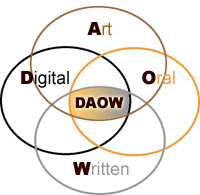 are crucial for personal, academic and workplace success in the Digital Age and blend very well in a digital storytelling environment. In my digital storytelling workshops we address how oral and written storytelling, as well as storytelling using digital and art skills, are involved in the creation of digital stories, and how all these literacies and forms of storytelling can reinforce each other. This improves literacy and expression in all areas."
are crucial for personal, academic and workplace success in the Digital Age and blend very well in a digital storytelling environment. In my digital storytelling workshops we address how oral and written storytelling, as well as storytelling using digital and art skills, are involved in the creation of digital stories, and how all these literacies and forms of storytelling can reinforce each other. This improves literacy and expression in all areas."I think Jason's article fits perfectly into the theme of "Technology Integration" that we've been exploring during this class. His article talks about how all of the components, not just digital are important, and it is the fusion of them all that makes them so impactful.
Teachers can also use digital stories to add dimension to classroom lecture. Often times certain ideas are best "seen" that is why you have science labs. Now without the long time consuming process of a lab, teachers can create short digital stories and have the students visualize something right in the middle of a quick lecture.
"Research has shown that the use of multimedia in teaching helps students retain new information as well as aids in the comprehension of difficult material."Educational Uses for Digital Storytelling
Subscribe to:
Comments (Atom)