I thought Animoto was a very well put together program. It was easy to upload pictures, add text below the pictures, or even title slides. It was very user friendly, you just click and drag the tiles where you want them to go. I was confused on how to cite my sources at the end though, I guess I should have thought about this step earlier in the process. When I was finding images and adding them to a file on my computer for uploading I thought the http:// address would still be there... it was not. This was me just not being very familiar with saving images. Trying to redo the images at the end seemed to daunting.... but then I was trying to think how I would site them even if I had them? Is the last slide in your story just a bunch of links to the websites? Even then it seemed like Animoto wouldn't allow large field's of text? Would you do more than one slide? That doesn't seem to be a very artistic way to end your slide show? Any hoo..I thought digital story telling would be a very fun thing for students to use in the classroom. The use of Animoto to tell a brief story about how the places I've lived have shaped my personality and life fit these standards.
ITSE NETS Student Standards
1. Creativity and innovation
Students demonstrate creative thinking, construct
knowledge, and develop innovative products and
processes using technology.
b. Create original works as a means of personal
or group expression
ITSE NETS Teacher Standards
1. Facilitate and inspire student learning
and creativity
Teachers use their knowledge of subject matter,
teaching and learning, and technology to facilitate
experiences that advance student learning,
creativity, and innovation in both face-to-face
and virtual environments.
a. Promote, support, and model creative
and innovative thinking and inventiveness
CCSS.ELA-LITERACY.W.4.3
Write narratives to develop real or imagined experiences or events using effective technique, descriptive details, and clear event sequences.
CCSS.ELA-LITERACY.W.4.3.A
Orient the reader by establishing a situation and introducing a narrator and/or characters; organize an event sequence that unfolds naturally.
Orient the reader by establishing a situation and introducing a narrator and/or characters; organize an event sequence that unfolds naturally.
CCSS.ELA-LITERACY.W.4.3.B
Use dialogue and description to develop experiences and events or show the responses of characters to situations.
Use dialogue and description to develop experiences and events or show the responses of characters to situations.
Use concrete words and phrases and sensory details to convey experiences and events precisely.
Puppet Pals
Puppet Pals seems like a great way for younger students to express their creativity via digital media. With this app, students pick out characters from the program, and add them to a pre-loaded backdrop. The students can then manipulate the images with their fingers while recording "the story" as they tell it. This is an apple application, and requires an iPad. Below is a short video tutorial.
Microsoft Photostory 3
Photostory 3 seems to be similar to Animoto, you can create slideshows with uploaded images from your own library or the web. There are many different editing tools, and you can add video or audio. This is a free application for use with PC's running windows. It can only be played back via windows media player. Below is a short video tutorial.
Digital storytelling is a great example of how new technologies have added to a classroom landscape that allows for more differentiated learning. When I was in school, extra curricular projects usually meant a poster, oral report, or the old shoe-box diorama, something that was very hands on crafty. Now with tools like digital storytelling, it gives students more choices, something they may get more excited about. It also gives teachers more ways to engage a broad range of interests.
The exert below was taken from, http://www.jasonohler.com/storytelling/storyeducation.cfm
"The DAOW of literacy in a storytelling environment
Digital, Art, Oral and Written literacies- the DAOW of literacy - 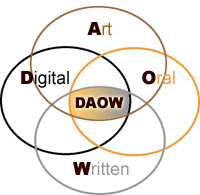 are crucial for personal, academic and workplace success in the Digital Age and blend very well in a digital storytelling environment. In my digital storytelling workshops we address how oral and written storytelling, as well as storytelling using digital and art skills, are involved in the creation of digital stories, and how all these literacies and forms of storytelling can reinforce each other. This improves literacy and expression in all areas."
are crucial for personal, academic and workplace success in the Digital Age and blend very well in a digital storytelling environment. In my digital storytelling workshops we address how oral and written storytelling, as well as storytelling using digital and art skills, are involved in the creation of digital stories, and how all these literacies and forms of storytelling can reinforce each other. This improves literacy and expression in all areas."I think Jason's article fits perfectly into the theme of "Technology Integration" that we've been exploring during this class. His article talks about how all of the components, not just digital are important, and it is the fusion of them all that makes them so impactful.
Teachers can also use digital stories to add dimension to classroom lecture. Often times certain ideas are best "seen" that is why you have science labs. Now without the long time consuming process of a lab, teachers can create short digital stories and have the students visualize something right in the middle of a quick lecture.
"Research has shown that the use of multimedia in teaching helps students retain new information as well as aids in the comprehension of difficult material."Educational Uses for Digital Storytelling

The DAOW of storytelling is an important link in all of this. Although I do not necessarily think it is limited to storytelling. Successful technology integration only really works when it is seamlessly connected to all that is being taught. It literally becomes part of the subject. This has been the argument that many people have used for years arguing the importance of the arts in schools (and LIFE). It is all intertwined. At their best, they are no longer separate.
ReplyDeleteNice digital story and Great image! The DAOW is perfect, and as Charlotte said, not just for digital storytelling but any project.
ReplyDelete